Rooms: your child's classroom and clubs
See your child's classroom, teachers, today's lessons, and clubs, and sign up for a club.
Last updated Oct 1, 2026
Rooms
Open Rooms in the top bar. With more than one child, pick a child from the tabs at the top.
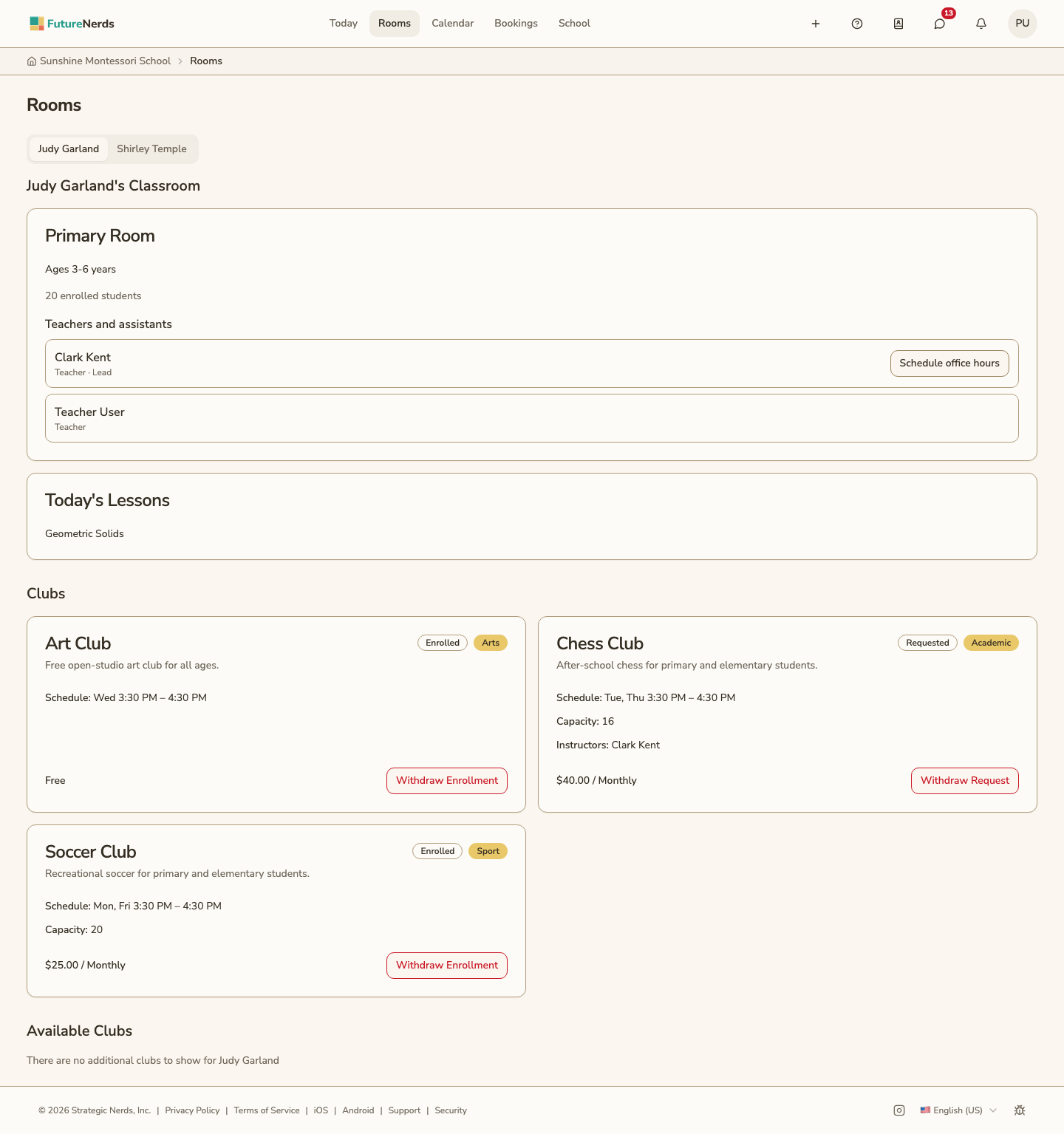
Your child's classroom
The classroom card shows:
- The room's name and description, such as the age range.
- How many students are enrolled.
- Teachers and assistants, with the lead teacher first.
Schedule office hours appears next to a teacher who has open office-hours times. It opens Bookings showing only that teacher's times.
Today's Lessons
Lists the lessons planned for the classroom today. The card appears only on days with planned lessons.
Clubs
Clubs lists the clubs your child belongs to. Available Clubs lists the clubs open to your child's classroom that they have not joined.
Each club card shows the schedule, capacity, season dates, and instructors when the school set them. The price is at the bottom of the card, or Free.
- Sign Up joins a club. Apply sends a request when the club needs the school's approval.
- Withdraw Enrollment leaves a club. Withdraw Request cancels a request that is still waiting.
See After-school clubs for signing up and leaving.
Was This Helpful?