Montessori lesson planning software for the work cycle
FutureNerds is Montessori lesson planning software. Guides plan each day's morning and afternoon work periods from a lesson library for their classroom's level, assign children to each lesson, and record mastery from the plan. Parents see Today's Lessons. It is free for your first 10 students.
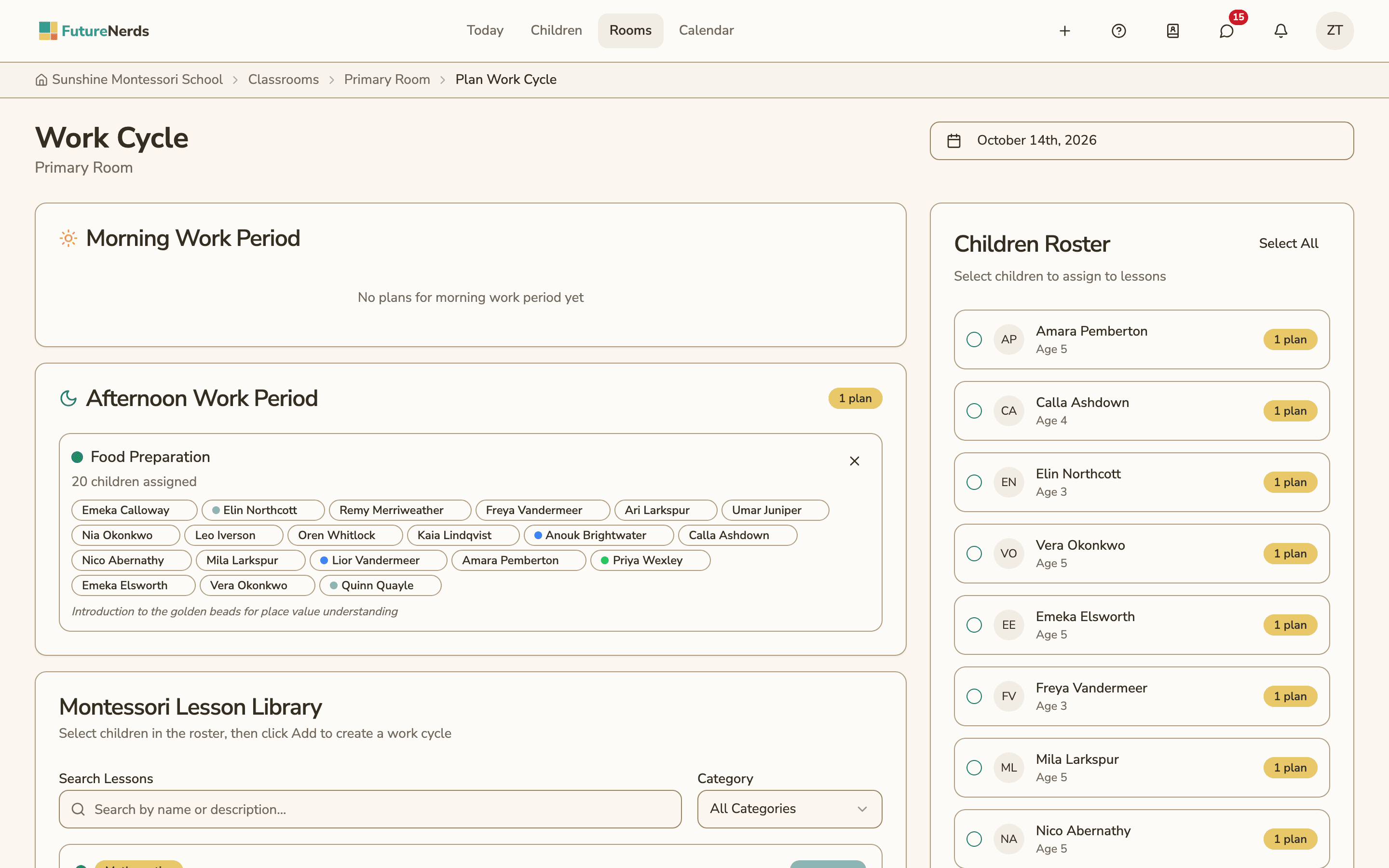
What the work cycle plan looks like
Each plan in FutureNerds is for a single classroom and date. The Plan Work Cycle page has three parts:
- Morning Work Period and Afternoon Work Period. Each box lists the lessons planned for that part of the day, with the children assigned to each one.
- Montessori Lesson Library. Every lesson in your curriculum for the classroom's level, with its curriculum area and a short description. You can search by name or description, or filter by category.
- Children Roster. Every child in the room, with their age. Select the children first, then add a lesson for them.
A guide in a Primary room sees Primary lessons such as Number Rods, Visual Discrimination and Land and Water Forms. A guide in a Lower Elementary room sees that level's lessons instead.
Where the lessons come from
The lesson library is your school's curriculum. When a school is created, FutureNerds sets up the curriculum from the AMS or AMI framework, and a school can also use a custom framework. Lessons are organized into areas such as Practical Life, Sensorial, Language, Mathematics and Cultural Studies.
Each curriculum area belongs to one of five age levels:
| Age level | Ages |
|---|---|
| Infant/Toddler | 0 to 3 |
| Primary | 3 to 6 |
| Lower Elementary | 6 to 9 |
| Upper Elementary | 9 to 12 |
| Adolescent | 12 to 15 |
When a lesson is not in the library, a guide types a custom activity name instead. Each planned lesson can also carry notes.
Recording mastery from the plan
Each child assigned to a lesson shows as a pill on the plan. A guide taps the pill to record the child's mastery level for that lesson:
| Level | Meaning |
|---|---|
| Not yet presented | The lesson has not been given |
| Presented | The guide gave the lesson |
| Practicing | The child is working with the material |
| Mastered | The child completes it independently |
The record is saved with the child's progress and marked as coming from a lesson plan. It shows on the classroom's Progress Grid and in the child's Learning tab. See observations and progress.
What parents see
On days with planned lessons, parents see Today's Lessons on the Rooms screen for their child's classroom. Lesson plans are also one of the sources for the end-of-day daily summary draft, which is filled from that day's attendance, observations and lesson plans. See toddler daily records.
Lesson planning works on the web and in the FutureNerds apps for iPhone, iPad and Android.
How to plan a work cycle in FutureNerds
- Open the classroom and choose Plan Work Cycle.
- Pick the date at the top of the page.
- In the Children Roster, select the children for the first lesson.
- Find the lesson in the Montessori Lesson Library by searching or filtering by category.
- Click Add and choose the morning or afternoon work period.
- If the lesson is not in the library, type a custom activity name and add it.
- During or after the lesson, tap a child's pill to record their mastery level.
What it costs
FutureNerds is free for your first 10 students. After that, it costs $0.50 per child per month, with no setup fee. See pricing.
Questions and answers
Does FutureNerds come with a Montessori lesson library?
Yes. FutureNerds sets up your lesson library from the AMS or AMI curriculum when the school is created. You can edit it or use a custom framework.
Can I plan morning and afternoon work periods separately?
Yes. Each plan in FutureNerds has a Morning Work Period and an Afternoon Work Period, and every lesson goes into one of them.
Can I record a child's progress from the lesson plan?
Yes. Tap the child's pill on a planned lesson to set presented, practicing or mastered. The level is saved to the child's progress record.
Can parents see what their child worked on today?
Parents see Today's Lessons on the Rooms screen on days that have planned lessons.
Can I add a lesson that is not in the library?
Yes. Type a custom activity name on the plan page and add it for the selected children.
Less paperwork. More presence.
Free for your first 10 students. No credit card required.