FutureNerds vs Montessori Compass: Montessori software compared
FutureNerds vs Montessori Compass: both keep Montessori records and lesson plans. Pick Montessori Compass for its library of over 3,000 lessons. Pick FutureNerds if you want billing, admissions and an interface in 14 languages: your first 10 students are free, then $0.50 per child per month.
Feature table
| FutureNerds | Montessori Compass | |
|---|---|---|
| Montessori curriculum | Yes (AMS, AMI or custom) | Yes (Montessori Foundation Scope & Sequence) |
| Observations and progress | Yes | Yes |
| Lesson planning | Yes | Yes |
| Attendance | Yes | Yes |
| Parent app | Yes (iPhone, iPad, Android, Apple Watch) | Yes (iOS and Android) |
| Messaging | Yes (push, email and in-app) | Yes (family communication) |
| Billing | Yes (built in, with Stripe) | Add-on (Growth Suite, $6.00 per student per month) |
| Admissions | Yes (form, waitlist, visit booking) | Add-on (Growth Suite) |
| Languages | 14 interface languages | English-only interface |
| API or AI agents | Yes (MCP server and CLI, off by default) | Not listed on its public pages |
| Price | Free for 10 children, then $0.50 per child per month | $2.00 per student per month, or $18 per year |
What each costs
Prices below were checked October 14, 2026, from the Montessori Compass pricing page. FutureNerds costs (children minus 10) x $0.50 a month. Montessori Compass costs $2.00 per student a month on monthly billing, or $18 per student a year on annual billing. The Growth Suite, which adds billing and admissions, costs $6.00 per student a month, or $48 a year.
| Children | FutureNerds | Compass, monthly | Compass, annual | Growth Suite, monthly |
|---|---|---|---|---|
| 25 | (25 - 10) x $0.50 = $7.50 a month | 25 x $2.00 = $50 a month | 25 x $18 = $450 a year | 25 x $6.00 = $150 a month |
| 40 | (40 - 10) x $0.50 = $15 a month | 40 x $2.00 = $80 a month | 40 x $18 = $720 a year | 40 x $6.00 = $240 a month |
| 80 | (80 - 10) x $0.50 = $35 a month | 80 x $2.00 = $160 a month | 80 x $18 = $1,440 a year | 80 x $6.00 = $480 a month |
For a year, FutureNerds costs $90 at 25 children, $180 at 40 and $420 at 80. The Growth Suite on annual billing costs $1,200, $1,920 and $3,840 at the same sizes.
FutureNerds has no setup fee. If your school collects payments from families through FutureNerds, standard Stripe fees plus 1% apply. Payment processing fees are separate for every product. See pricing.
Montessori Compass offers free do-it-yourself onboarding, or paid onboarding at $995 or $2,995. Its subscriptions bill all year, with no pause in summer.
Where Montessori Compass is stronger
- It covers "Over 3,000 lessons from infant through age 12".
- Its scope and sequence is the Montessori Foundation Scope & Sequence, from Infant/Toddler through Upper Elementary.
- Help articles cover standards mapping, trackers, batch entry and personal growth skills.
- It offers a 30-day free trial with no credit card, and an annual plan at $18 per student.
- When you switch to it, it imports students, families and staff for free, and reviews a sample of your observation history first.
- It appears in 9 of the 10 public "best Montessori software" lists we checked, such as this one. FutureNerds is newer and does not appear in those lists yet.
Where FutureNerds is stronger
- Billing and admissions are in the same price. FutureNerds includes invoicing, Stripe card payments, sibling discounts, scholarships and an application fee. Montessori Compass puts tuition and admissions in the Growth Suite.
- Languages. FutureNerds runs in 14 languages, including Spanish, French, German, Chinese, Japanese and Korean. The Montessori Compass interface is English only.
- Self-serve import. You import families yourself from a CSV or Excel file. Montessori Compass imports are run by its support team.
- Parent absence reports. Parents report an absence with a reason (illness, personal reason, medical appointment or vacation), and it shows as Scheduled on the staff Today screen.
- AI agents. A school admin can turn on the MCP server and CLI, which are off by default.
FutureNerds has its own limits. Its help center and these pages are in English. It has no direct QuickBooks sync. Invoices and payments export as a QuickBooks-format CSV. Apple Pay and Google Pay are not available yet.
Who should pick which
Pick Montessori Compass if you want the largest ready-made lesson library, you pay yearly, and you run billing in another tool.
Pick FutureNerds if you want billing and admissions without a second plan, if your staff or families work in a language other than English, or if price matters. A 40-child school pays $15 a month on FutureNerds and $240 a month on the Growth Suite.
How to move from Montessori Compass to FutureNerds
- Export from Montessori Compass before you cancel. It keeps data 90 days after cancellation, then deletes it.
- Export student profiles to CSV from Student Profiles, as its export article describes. Ask its support team for other data.
- From Reports, export the Classroom Roster and Attendance as spreadsheets and Contact Information as CSV, per its reports article.
- Create your FutureNerds school and pick AMS, AMI or a custom curriculum.
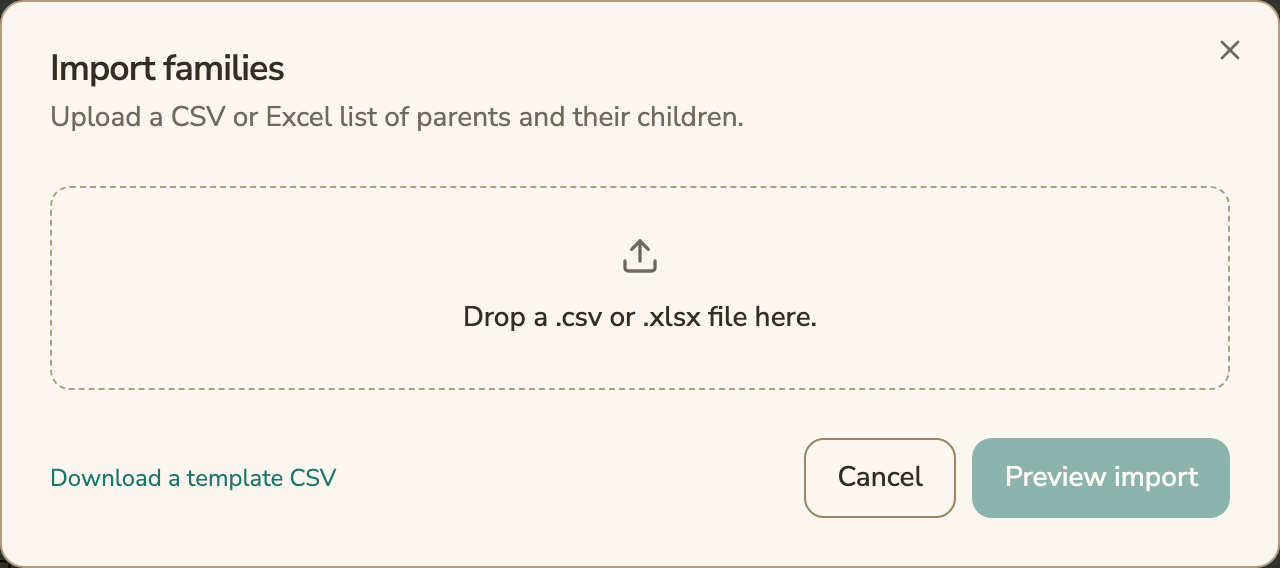
- Open Settings, then Import Families. Download the template CSV, fill it from your export, and drop in the .csv or .xlsx file.
- Choose Preview import, fix any rows it flags, then import. Assign each child to a classroom.
- Invite parents from the Family Roster.
The family import brings in parents and children. Keep your other exports as files. See switching from another system.
Questions and answers
Montessori Compass vs FutureNerds: which costs less?
FutureNerds costs less at every size we checked. At 40 children, FutureNerds is $15 a month, Montessori Compass is $80 a month on monthly billing, and the Growth Suite with billing and admissions is $240 a month.
Does FutureNerds include tuition billing?
Yes. FutureNerds includes invoicing and online card payments through Stripe in its per-child price. Montessori Compass offers tuition billing in its Growth Suite.
Is FutureNerds available in languages other than English?
Yes. The FutureNerds interface is in 14 languages on web, iPhone and Android. Its help center is in English.
Does FutureNerds have a free trial?
FutureNerds is free for your first 10 students, with no time limit. After that it is $0.50 per child per month, with no setup fee.
Can I import my Montessori Compass students into FutureNerds?
Yes. Export your student profiles to CSV from Montessori Compass, then use Import Families in FutureNerds to bring in parents and children.
Sources
All checked October 14, 2026.
- Montessori Compass home page: https://www.montessoricompass.com/
- Montessori Compass pricing: https://www.montessoricompass.com/pricing
- Switching to Montessori Compass: https://www.montessoricompass.com/migration/switch/
- Subscription billing: https://help.montessoricompass.com/support/solutions/articles/68000007747-how-subscription-billing-works
- Attendance: https://help.montessoricompass.com/support/solutions/articles/68000030024-attendance
- Reports: https://help.montessoricompass.com/support/solutions/articles/68000030025-reports
- Growth Suite tuition and payments: https://help.montessoricompass.com/support/solutions/articles/68000007978-does-the-growth-suite-handle-tuition-and-payment-collection-
- Growth Suite admissions: https://help.montessoricompass.com/support/solutions/articles/68000007968-does-the-growth-suite-handle-admissions-
- Languages: https://help.montessoricompass.com/support/solutions/articles/68000008111-does-montessori-compass-support-multiple-languages-
- Cancellation and data: https://help.montessoricompass.com/support/solutions/articles/68000008106-what-happens-to-my-data-if-i-cancel-
- Exporting data: https://help.montessoricompass.com/support/solutions/articles/68000008108-can-i-export-my-data-
- Bulk import: https://help.montessoricompass.com/support/solutions/articles/68000007725-import-student-parent-profiles-in-bulk-via-spreadsheet
- Help center: https://help.montessoricompass.com/support/solutions
- WifiTalents, best Montessori record keeping software: https://wifitalents.com/best/montessori-record-keeping-software/
Less paperwork. More presence.
Free for your first 10 students. No credit card required.