Connect an AI agent to your Montessori school: FutureNerds MCP server
You can connect an AI agent to your Montessori school with the FutureNerds MCP server at https://www.futurenerds.dev/api/mcp. Claude, Cursor and other MCP clients connect with a school API key, then read and change school records within the role of the person who made the key.
What the MCP server is
MCP (Model Context Protocol) is an open standard that lets an AI assistant call tools in another app. The FutureNerds MCP server gives an assistant more than 380 tools, such as taking attendance or creating an invoice.
| Setting | Value |
|---|---|
| Endpoint | https://www.futurenerds.dev/api/mcp |
| Transport | Streamable HTTP, POST only, stateless, JSON responses |
| Authentication | Authorization: Bearer <token> |
| Token | A school API key that starts with fn_, or a signed-in FutureNerds session token |
| OAuth | Not offered. Send the key in the header |
| Rate limit | 120 requests per minute per user. Writes and money actions have smaller budgets |
| Audit | Every tool call is written to the school's audit log |
Who can connect, and what they can reach
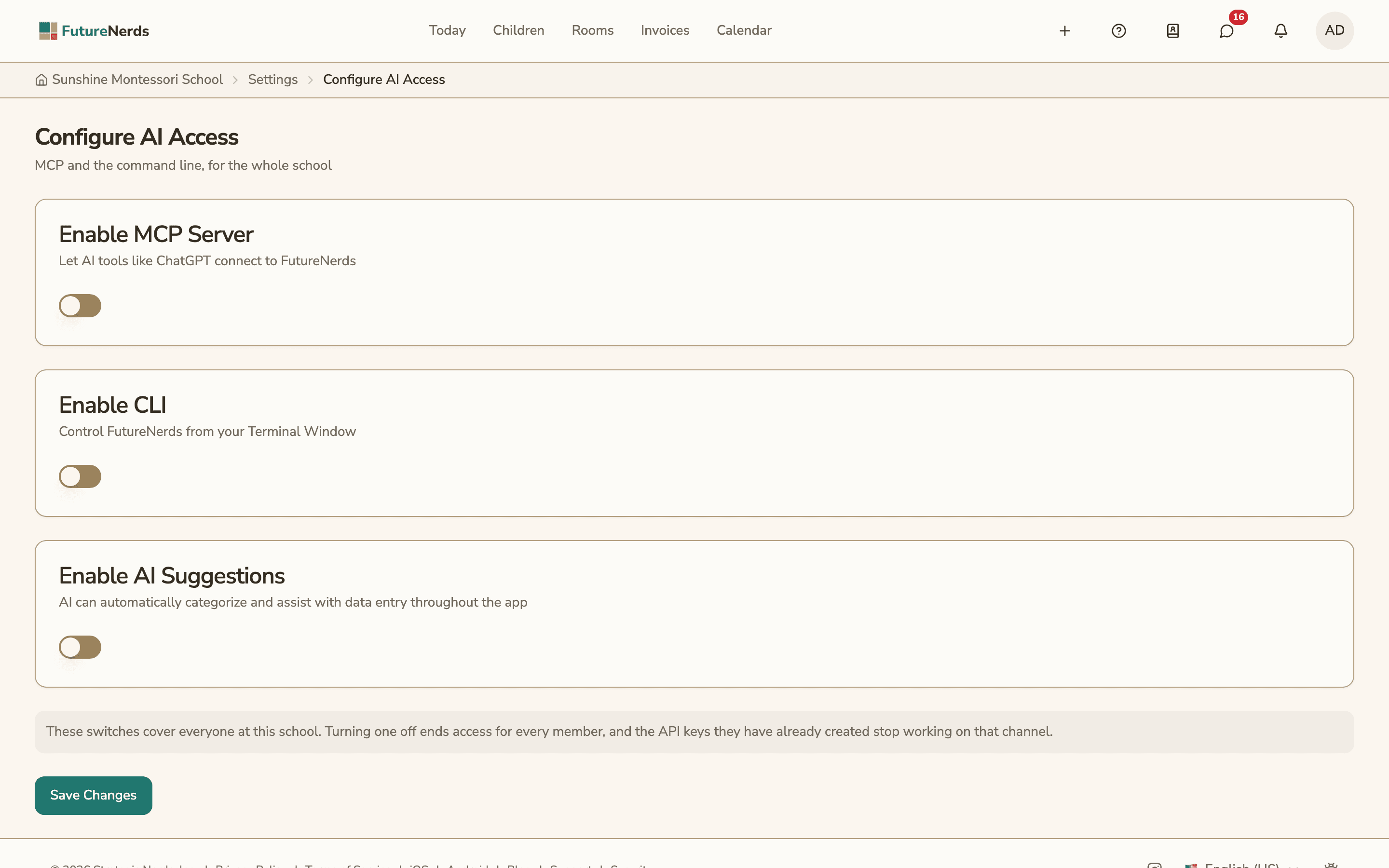
Two switches control access, and both are off when a school starts.
- An administrator opens Settings, chooses Configure AI Access, and turns on Enable MCP Server, Enable CLI, or both. Turning a switch off later ends access for every member on that channel, and their existing keys stop working on it.
- Each person then creates their own key. They open their profile, choose the AI Access tab, and use the Create API Keys card.
A new key asks for:
- School: the school the key works for
- Works With: MCP Server or Command Line
- Label: a name you will recognize later, such as "Laptop terminal"
- Expires On: one year from today unless you pick another date
The key is shown once. FutureNerds stores only a SHA-256 hash of it. The key list shows each key as Active, Expired or Revoked, with the last time it was used. Revoke stops a key right away, for good.
A key belongs to one person, one school and one channel. The assistant gets the same access that person has in the app. The tool list is filtered by their roles, and the database applies the same row-level security rules as the website. Destructive actions, such as deletes and payment changes, need an explicit confirmation.
Example tools
| Tool | What it does |
|---|---|
child_list | Lists children at the school |
attendance_mark | Records present, absent or tardy for a child |
observation_create | Records an observation |
billing_invoice_create | Creates an invoice |
application_decision | Approves, waitlists or rejects an application |
calendar_feed_get | Returns the school's private calendar feed link |
action_suggest takes a request in plain words and suggests up to three tools. It works only when the school uses AI suggestions, which are optional and off by default. An administrator turns them on, and children's names are removed before any text is sent.
Configuration for Claude and Cursor
Replace fn_YOUR_KEY with the key you copied.
Claude Code. Run this once:
claude mcp add --transport http futurenerds https://www.futurenerds.dev/api/mcp --header "Authorization: Bearer fn_YOUR_KEY"
Or add it to a project's .mcp.json:
{
  "mcpServers": {
    "futurenerds": {
      "type": "http",
      "url": "https://www.futurenerds.dev/api/mcp",
      "headers": {
        "Authorization": "Bearer fn_YOUR_KEY"
      }
    }
  }
}
Claude Desktop. Add FutureNerds to claude_desktop_config.json through mcp-remote, a small Node.js bridge that sends the header for Claude Desktop:
{
  "mcpServers": {
    "futurenerds": {
      "command": "npx",
      "args": [
        "-y",
        "mcp-remote",
        "https://www.futurenerds.dev/api/mcp",
        "--header",
        "Authorization:${FUTURENERDS_AUTH}"
      ],
      "env": {
        "FUTURENERDS_AUTH": "Bearer fn_YOUR_KEY"
      }
    }
  }
}
Cursor. Add this to ~/.cursor/mcp.json, or to .cursor/mcp.json in a project:
{
  "mcpServers": {
    "futurenerds": {
      "url": "https://www.futurenerds.dev/api/mcp",
      "headers": {
        "Authorization": "Bearer fn_YOUR_KEY"
      }
    }
  }
}
How to connect Claude to FutureNerds
- Ask a school administrator to open Settings, choose Configure AI Access, turn on Enable MCP Server and select Save Changes.
- Open your profile and choose the AI Access tab.
- In Create API Keys, select New Key. Choose the school, set Works With to MCP Server, enter a label and check the expiry date.
- Select Create Key and copy the key that starts with
fn_. - Add the server to Claude with one of the configurations above, using your key.
- Restart Claude Desktop, or start a new Claude Code session.
- Ask Claude to list your schools and roles. The
account_context_gettool answers with the schools, roles and tools your key can reach.
The fnerds command-line tool
fnerds is the FutureNerds CLI. It calls the same tools over the same endpoint.
- Sign in with
fnerds auth login, which opens a browser. A browser login counts as an MCP connection, so it needs Enable MCP Server. - Or set
FNERDS_API_KEYto a key with Works With set to Command Line. This needs Enable CLI. fnerds child listandfnerds attendance mark --child-id <id> --classroom-id <id> --date 2026-10-14 --status presentrun common actions.fnerds tool capabilitieslists your schools, roles and tools.fnerds tool call <name> --args '{...}'runs any tool.--jsonprints JSON, and--confirmconfirms a destructive action.
ChatGPT and OpenAPI
GET https://www.futurenerds.dev/api/openapi returns an OpenAPI 3.1 file built from the same tool list, for ChatGPT GPT Actions. It describes one POST endpoint per tool at /api/mcp/tools/{name}. With a Bearer token, the file lists only the tools for that person's roles. These endpoints take only a signed-in session token, which expires, and do not accept fn_ keys yet. For a connection that keeps working, use an MCP client with a key on /api/mcp.
What it costs
FutureNerds is free for your first 10 students. After that it costs $0.50 per child per month, with no setup fee. If your school collects payments from families through FutureNerds, standard Stripe fees plus 1% apply. See pricing.
Questions and answers
Does FutureNerds have an MCP server?
Yes. The FutureNerds MCP server is at https://www.futurenerds.dev/api/mcp and uses Streamable HTTP. A school administrator turns it on under Configure AI Access.
How does an AI agent sign in to FutureNerds?
With a Bearer token in the Authorization header: a school API key that starts with fn_, created under Profile, AI Access. FutureNerds does not offer OAuth for MCP.
Can an AI agent see more than the person who made the key?
No. The key acts as that person, at one school. FutureNerds filters the tools by their roles and applies the same database rules as the app.
Is the MCP server on by default?
No. Enable MCP Server and Enable CLI are both off until an administrator turns them on.
Can I use FutureNerds with ChatGPT?
Not well yet. FutureNerds publishes an OpenAPI file for GPT Actions at https://www.futurenerds.dev/api/openapi, but its endpoints need a signed-in session token that expires. Claude, Cursor and other MCP clients connect with a lasting fn_ key.
Less paperwork. More presence.
Free for your first 10 students. No credit card required.