FutureNerds vs brightwheel: Montessori software compared
FutureNerds vs brightwheel: pick brightwheel if you run a childcare center that needs payroll, staff scheduling and CACFP menus. Pick FutureNerds if you want Montessori records, billing and admissions at a published price: your first 10 students are free, then $0.50 per child per month.
Feature table
| FutureNerds | brightwheel | |
|---|---|---|
| Montessori curriculum | Yes (AMS, AMI or custom) | Yes (scope and sequence aligned with AMS and AMI) |
| Observations and progress | Yes | Yes |
| Lesson planning | Yes | Yes |
| Attendance | Yes | Yes |
| Parent app | Yes (iPhone, iPad, Android, Apple Watch) | Yes (App Store and Google Play) |
| Messaging | Yes (push, email and in-app) | Yes |
| Billing | Yes (built in, with Stripe) | Yes |
| Admissions | Yes (form, waitlist, visit booking) | Yes |
| Payroll and staff scheduling | No | Yes |
| Languages | 14 interface languages | English and Spanish |
| API or AI agents | Yes (MCP server and CLI, off by default) | Not listed on its public pages |
| Price | Free for 10 children, then $0.50 per child per month | Quote only |
What each costs
Prices below were checked October 14, 2026. brightwheel does not publish prices. Its pricing page is a form that asks for your role, enrollment capacity and number of locations. Its billing page names two payment service fees, one for cards and one for ACH and check deposits, without amounts.
FutureNerds costs (children minus 10) x $0.50 a month:
| Children | FutureNerds |
|---|---|
| 25 | (25 - 10) x $0.50 = $7.50 a month |
| 40 | (40 - 10) x $0.50 = $15 a month |
| 80 | (80 - 10) x $0.50 = $35 a month |
FutureNerds has no setup fee. If your school collects payments from families through FutureNerds, standard Stripe fees plus 1% apply. Payment processing fees are separate for every product. See pricing.
Where brightwheel is stronger
- Staff and center tools. brightwheel lists staff scheduling, payroll, CACFP menus, health checks, expense management, CRM and enrollment forecasting. FutureNerds has no payroll, staff scheduling, CACFP or subsidy tools.
- Payments. brightwheel takes ACH, debit and credit cards, and checks, with autopay, recurring invoices and late fees. Online payments submitted by 7 pm ET are deposited the next business day. FutureNerds takes cards through Stripe and records offline payments. Apple Pay and Google Pay are not available in FutureNerds yet.
- A Montessori scope and sequence "built by a credentialed Montessori educator", aligned with AMS and AMI, covering Sensorial, Language, Math, Cultural and Practical Life.
- Spanish for everyone. Admins, guides, teachers and families can use it in English or Spanish.
- Recognition. brightwheel appears in 8 of the 10 public "best Montessori software" lists we checked, such as this one. FutureNerds is newer and does not appear in those lists yet.
Where FutureNerds is stronger
- A published price. You can work out your bill before you talk to anyone. brightwheel prices are by quote.
- Montessori progress levels. Every lesson is tracked as not yet presented, presented, practicing or mastered, and you can rename the levels. A progress grid shows a whole classroom against each lesson.
- Work cycle planning. Guides plan a morning or afternoon work period from the Montessori lesson library and assign children to each lesson.
- Languages. FutureNerds runs in 14 languages, including Spanish, French, German, Chinese, Japanese and Korean. brightwheel lists English and Spanish.
- Billing follows your school year. Each session lists the months you bill families, and months outside that list are not charged.
- AI agents. A school admin can turn on the MCP server and CLI, which are off by default.
Both products send billing data to QuickBooks by file. brightwheel describes its QuickBooks Online path as "not a complete, automated integration". FutureNerds exports invoices and payments as a QuickBooks-format CSV.
Who should pick which
Pick brightwheel if you run a licensed childcare center that needs payroll, staff scheduling, CACFP and next-business-day deposits in one product.
Pick FutureNerds if you run a Montessori school, want records that follow presented, practicing and mastered, and want to know the price up front. A 40-child school pays $15 a month on FutureNerds.
How to move from brightwheel to FutureNerds
- In brightwheel on the web, go to My School, then Students, then Export Roster, as its roster export article describes.
- Pick the fields you want, including contacts and rooms, and email the file to yourself. Use the Enrollment Status filter if you need children who are not active.
- Use Downloads in brightwheel reports to email yourself CSVs of check-ins, notes and other records, per its reports article. Keep them as files.
- Create your FutureNerds school and pick AMS, AMI or a custom curriculum.
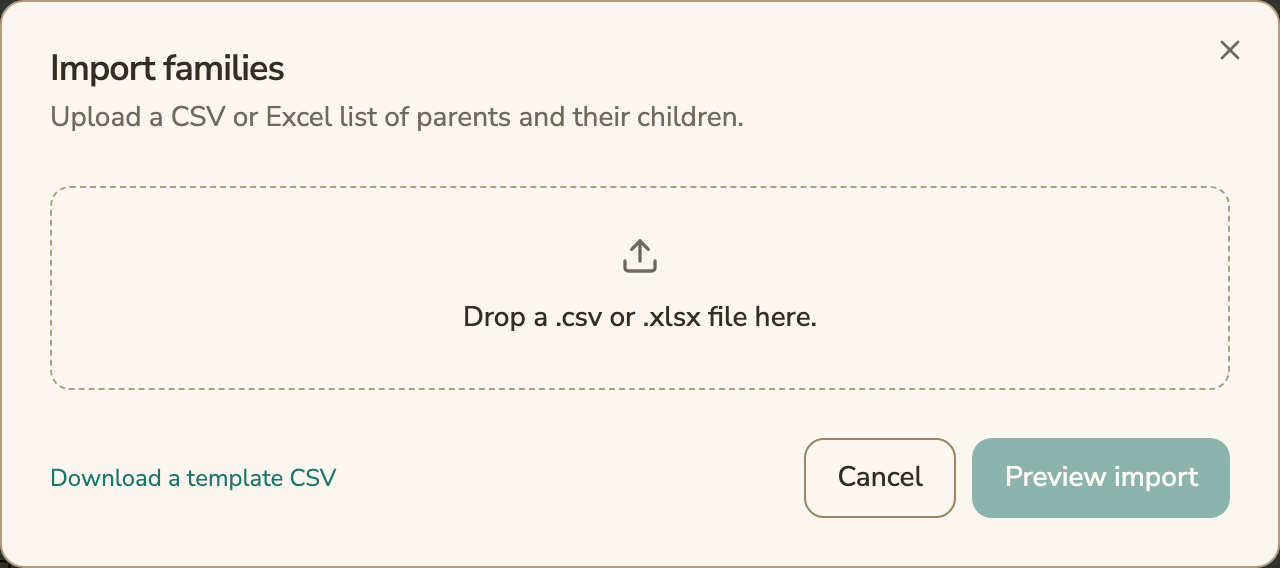
- Open Settings, then Import Families. Download the template CSV, fill it from your roster, and drop in the .csv or .xlsx file.
- Choose Preview import, fix any rows it flags, then import. Assign each child to a classroom.
- Set up your price list and connect Stripe if you will take card payments.
- Invite parents from the Family Roster.
Questions and answers
How much does brightwheel cost compared with FutureNerds?
brightwheel does not publish prices. Its pricing page asks for your details to build a quote. FutureNerds is free for your first 10 students, then $0.50 per child per month.
Does FutureNerds have payroll or staff scheduling like brightwheel?
No. FutureNerds has no payroll, staff scheduling, CACFP or subsidy tools. If you need those, brightwheel lists all of them.
Is brightwheel or FutureNerds better for Montessori record keeping?
Both have a Montessori scope and sequence aligned with AMS and AMI. FutureNerds tracks each lesson as not yet presented, presented, practicing or mastered, and shows a classroom progress grid.
Can parents pay tuition online in FutureNerds?
Yes. Parents pay by card through Stripe, or upload proof of a bank transfer for the school to confirm. Standard Stripe fees plus 1% apply.
Does FutureNerds work in Spanish?
Yes. FutureNerds runs in 14 languages, including Spanish, on web, iPhone and Android. Its help center is in English.
Sources
All checked October 14, 2026.
- brightwheel Montessori page: https://mybrightwheel.com/montessori
- brightwheel Montessori communication page: https://mybrightwheel.com/montessori/communication
- brightwheel billing page: https://mybrightwheel.com/billing
- brightwheel pricing page: https://mybrightwheel.com/pricing/
- brightwheel roster export: https://intercom.help/brightwheel/en/articles/942385-roster-export
- brightwheel reports and data: https://intercom.help/brightwheel/en/articles/942384-reports-data-overview
- Gitnux, best Montessori school management software: https://gitnux.org/best/montessori-school-management-software/
Less paperwork. More presence.
Free for your first 10 students. No credit card required.