Montessori observation and record keeping software
FutureNerds is Montessori observation and record keeping software. Guides record observations, track every lesson from not yet presented to mastered on an AMS, AMI or custom curriculum, and choose what parents see. It runs on the web, iPhone, iPad and Android, and it is free for your first 10 students.
What guides record
An observation in FutureNerds is a short written note about one child. Each one has a type, and it can be linked to a curriculum area or to one competency, such as Golden Beads or Sandpaper Letters.
| Observation type | What it covers |
|---|---|
| General | Anything a guide notices |
| Curriculum area | Work in an area such as Language or Sensorial |
| Competency | Work on one lesson |
| Grace and courtesy | Manners and care for others |
| Conflict resolution | How a child works through a disagreement |
| Emotional regulation | How a child handles strong feelings |
| Community contribution | Help given to the class |
| Progress assessment | A check on where a child stands |
Every observation has a "Share with parents" switch. It starts off, so a note stays with staff until a guide turns it on.
Guides can record from Quick Record, a floating button that saves an observation, a progress update and a daily tracking entry in one step. They can also record from the Learning tab on a child's page.
Progress notes are a separate record for longer comments. Each one has a type (Academic, Social, Emotional, Physical or General), strengths, areas for growth and a follow-up flag. Progress notes are shared with parents unless the guide turns sharing off.
Incident reports are staff only. One report can cover several children.
Mastery levels and the progress grid
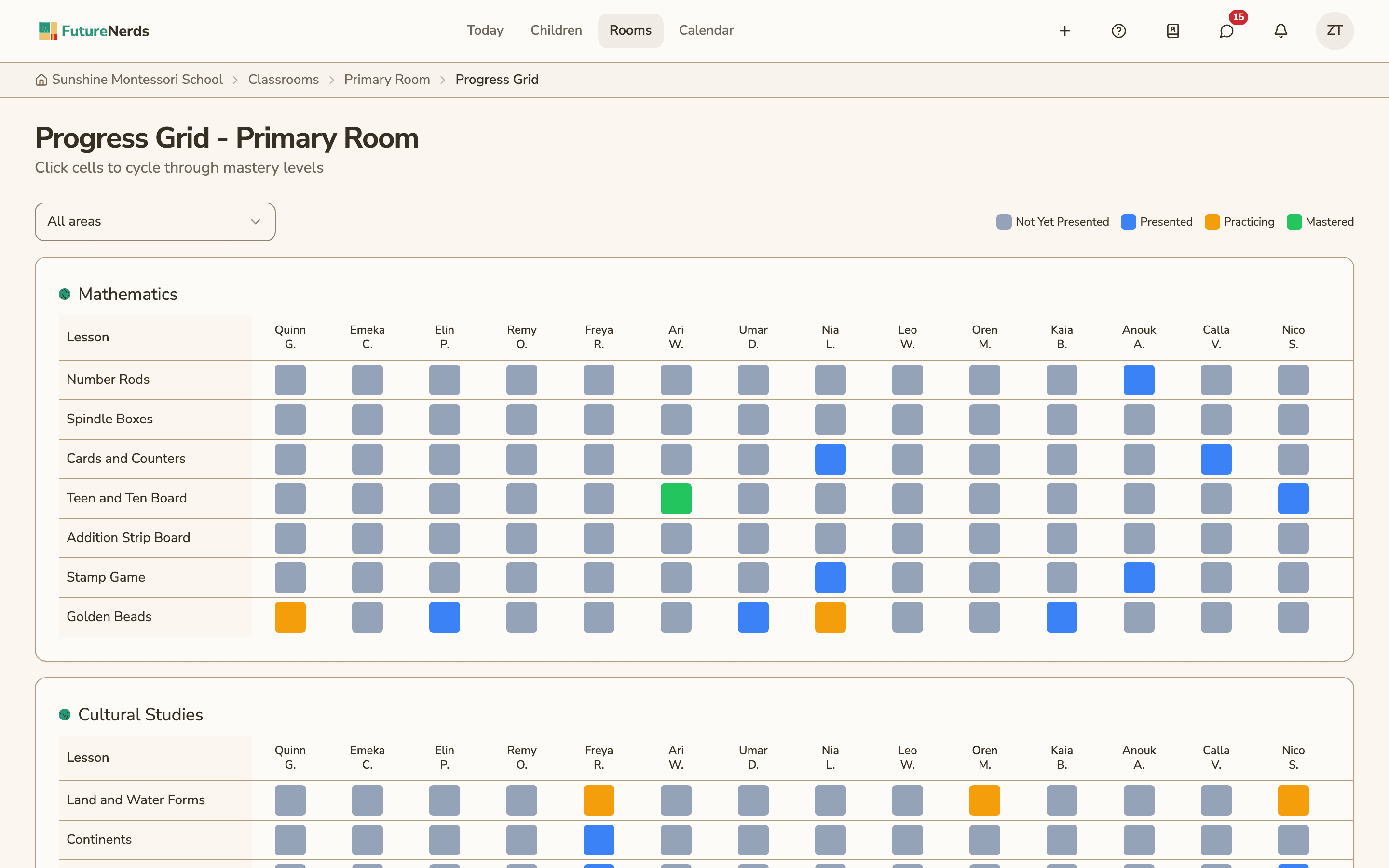
Each child moves through four mastery levels for each competency:
- Not yet presented
- Presented
- Practicing
- Mastered
A school owner can rename the four levels and change their colors in settings. Every mastery record notes how it was entered, for example by hand, from a lesson plan or from an assessment.
The Progress Grid shows a whole classroom at once. Children run across the top, lessons run down the side, and each cell shows the child's level in its color. Click a cell to move it to the next level. A filter at the top narrows the grid to one curriculum area.
Your curriculum: AMS, AMI or your own
When a school is created, FutureNerds sets up its curriculum from the AMS or AMI framework. AMS is the default. A school can also choose a custom framework and build its own.
The curriculum has areas, such as Practical Life, Sensorial, Language, Mathematics and Cultural Studies, with competencies inside each area. Every area belongs to one age level:
| Age level | Typical ages |
|---|---|
| Infant/Toddler | 0 to 3 |
| Primary | 3 to 6 |
| Lower Elementary | 6 to 9 |
| Upper Elementary | 9 to 12 |
| Adolescent | 12 to 15 |
You can add, rename and remove areas and competencies at any time.
Portfolio and what parents see
Guides can save an observation to a child's portfolio with a caption and its own parent visibility switch. Parents open the Learning tab for their child to read shared observations, the progress list or grid, and the portfolio.
The same records are used when a guide writes an assessment. "Generate draft from observations" fills the assessment fields from observations and progress that parents can already see. See report cards.
AI suggestions for linking an observation to a competency are optional and off by default. A school admin turns them on, and children's names are removed before any text is sent.
How to record an observation in FutureNerds
- Tap the Quick Record button, or open a child and go to the Learning tab.
- Pick the child and the observation type.
- Link a curriculum area or a competency if the note is about a lesson.
- Set the mastery level if the child's level changed.
- Write what you saw.
- Turn on "Share with parents" if the family should read it.
- Save. To review the class, open the Progress Grid for the classroom.
What it costs
FutureNerds is free for your first 10 students. After that, it costs $0.50 per child per month, with no setup fee. See pricing.
Questions and answers
Does FutureNerds support AMS and AMI curricula?
Yes. FutureNerds sets up your curriculum from the AMS or AMI framework when the school is created, and AMS is the default. You can also choose a custom framework and edit every area and competency.
What mastery levels does FutureNerds use?
Not yet presented, presented, practicing and mastered. A school can rename the levels and change their colors.
Can parents see their child's observations?
Parents see only the observations a guide shares. Each observation has a "Share with parents" switch that starts off.
Can teachers record observations on a phone?
Yes. Observations work in the FutureNerds apps for iPhone, iPad and Android as well as on the web.
Is there a free Montessori record keeping app?
FutureNerds is free for your first 10 students, with observations included. After that, it costs $0.50 per child per month.
Less paperwork. More presence.
Free for your first 10 students. No credit card required.