Parent
School lifeManaging notification preferences
Choose which notifications you get, and how: in the app, by email, or by push.
Last updated Oct 1, 2026
Notification settings
- Click your avatar in the top right.
- Click Profile Settings.
- Open Notifications. The other tabs are Profile, Appearance, and Account.
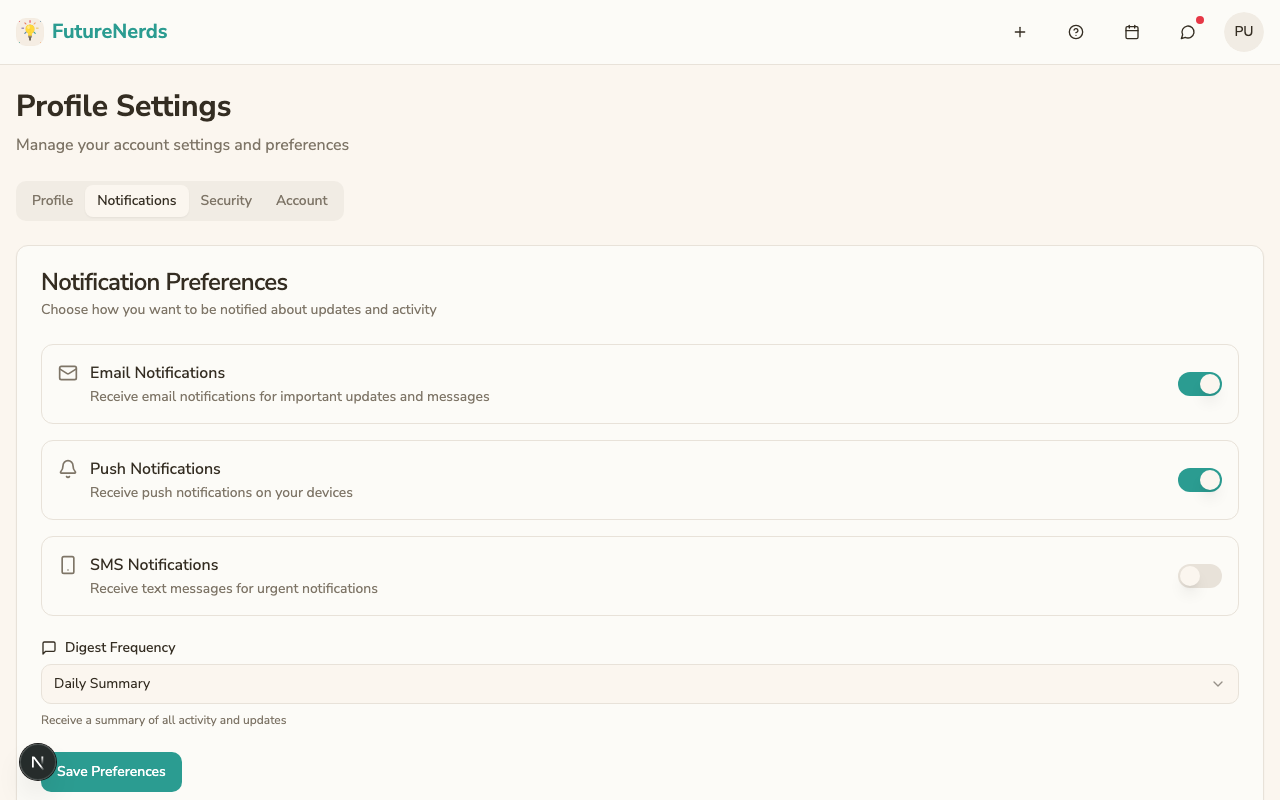
Changes save as you make them.
- Email Notifications and Push Notifications -- turn each channel on or off. Push goes to the FutureNerds app on your phone.
- Digest Frequency -- choose Daily Summary for an end-of-day email.
- Mute Everything -- turns every type off.
- Per type, choose how each one reaches you:
- Messages and Posts -- Direct messages, Classroom notices, School posts.
- Billing -- New invoices, Payment receipts, Overdue invoices.
- Your Child -- Lessons, Observations, Assessments, Attendance, Incident Reports.
- Summaries -- Daily summary.
Your recent notifications are listed below the settings. The bell in the top bar opens the same list.
FutureNerds does not send marketing email to parents.
Was This Helpful?