FutureNerds vs Transparent Classroom: Montessori software compared
FutureNerds vs Transparent Classroom: both are Montessori record keeping software. Pick Transparent Classroom if you want a long-established tool with AMI and AMS lesson sets. Pick FutureNerds if you also want tuition billing, admissions and a lower price: your first 10 students are free, then $0.50 per child per month.
Feature table
| FutureNerds | Transparent Classroom | |
|---|---|---|
| Montessori curriculum | Yes (AMS, AMI or custom) | Yes (AMI and AMS lesson sets) |
| Observations and progress | Yes | Yes |
| Lesson planning | Yes | Yes |
| Attendance | Yes | Yes |
| Parent app | Yes (iPhone, iPad, Android, Apple Watch) | Yes (iOS and Android parent view) |
| Messaging | Yes (push, email and in-app) | Through the Onespot partnership |
| Billing | Yes (built in, with Stripe) | Through the Onespot partnership |
| Admissions | Yes (form, waitlist, visit booking) | Yes (online applications) |
| Languages | 14 interface languages | 15 in the site's language menu |
| API or AI agents | Yes (MCP server and CLI, off by default) | Not listed on its public pages |
| Price | Free for 10 children, then $0.50 per child per month | $2.50 per child per month |
What each costs
Prices below were checked October 14, 2026. FutureNerds costs (children minus 10) x $0.50 a month. Transparent Classroom costs children x $2.50 a month, per its pricing page.
| Children | FutureNerds | Transparent Classroom |
|---|---|---|
| 25 | (25 - 10) x $0.50 = $7.50 a month | 25 x $2.50 = $62.50 a month |
| 40 | (40 - 10) x $0.50 = $15 a month | 40 x $2.50 = $100 a month |
| 80 | (80 - 10) x $0.50 = $35 a month | 80 x $2.50 = $200 a month |
FutureNerds has no setup fee. If your school collects payments from families through FutureNerds, standard Stripe fees plus 1% apply. Payment processing fees are separate for every product. See pricing.
Transparent Classroom charges only for children enrolled the previous month, and summer closures cost nothing. Its price includes unlimited classrooms, staff, support and training. Its pricing page shows no free tier, and it lists a "Request Trial" link with no trial length given.
Where Transparent Classroom is stronger
- It describes itself as "made by Montessori educators for Montessori educators." It was founded in 2012 and says it serves over 2,500 schools in 89 countries.
- It ships lesson sets for AMI Toddler, Primary and Elementary, and AMS Elementary, which schools can customize.
- Admins can set progress scales of up to six levels and colors. FutureNerds uses four levels, which you can rename and recolor.
- Conference reports are built with a drag-and-drop editor.
- Its site menu lists 15 languages, and its help center has a Spanish section. FutureNerds' interface is in 14 languages, and its help center is in English.
- It appears in every public "best Montessori software" list we checked, such as this one. FutureNerds is newer and does not appear in those lists yet.
Where FutureNerds is stronger
- Billing is built in. You set tuition, fees, club fees, meals and field trips, billed weekly, monthly, quarterly, by semester, yearly or once. Sibling discounts, scholarships and a pay-in-full discount are included. Transparent Classroom sends schools to a partner, Onespot, for tuition billing.
- Application fees run through Stripe. Transparent Classroom needs a payment button from an outside provider such as PayPal.
- Admissions has a waitlist and visit booking. Applications move through statuses including submitted, under review, visit requested, visit scheduled, waitlisted, approved and rejected. Families book visits through Cal.com.
- Parents do more in the app. They report absences, pay invoices, sign documents and book office hours. The Transparent Classroom parent view shows the homepage, activity and photos.
- Toddler daily records. Infant and toddler rooms log naps, meals, diapers, activities and mood.
- AI agents. A school admin can turn on the MCP server and CLI, which are off by default.
FutureNerds has its own limits. It has no direct QuickBooks sync. Invoices and payments export as a QuickBooks-format CSV. Apple Pay and Google Pay are not available yet. Automatic invoicing is off by default and creates drafts that an admin sends.
Who should pick which
Pick Transparent Classroom if record keeping is all you need, you want the AMI Elementary lesson set, and a tool used by thousands of schools matters to you.
Pick FutureNerds if you want records, billing, admissions and parent messaging in one account, or if price matters. A 40-child school pays $15 a month on FutureNerds and $100 a month on Transparent Classroom.
How to move from Transparent Classroom to FutureNerds
- Export everything from Transparent Classroom before you cancel. Its cancellation article says you lose access after cancelling. You can export child and parent profiles, lesson information, photos, conference reports and progress reports yourself.
- Download your family list. Go to Directories, choose Parents or Students, then Download, as Onespot's help center describes.
- Download photos from Photos, then Download all. Photos download one calendar year at a time, so repeat it for each year.
- Create your FutureNerds school and pick AMS, AMI or a custom curriculum.
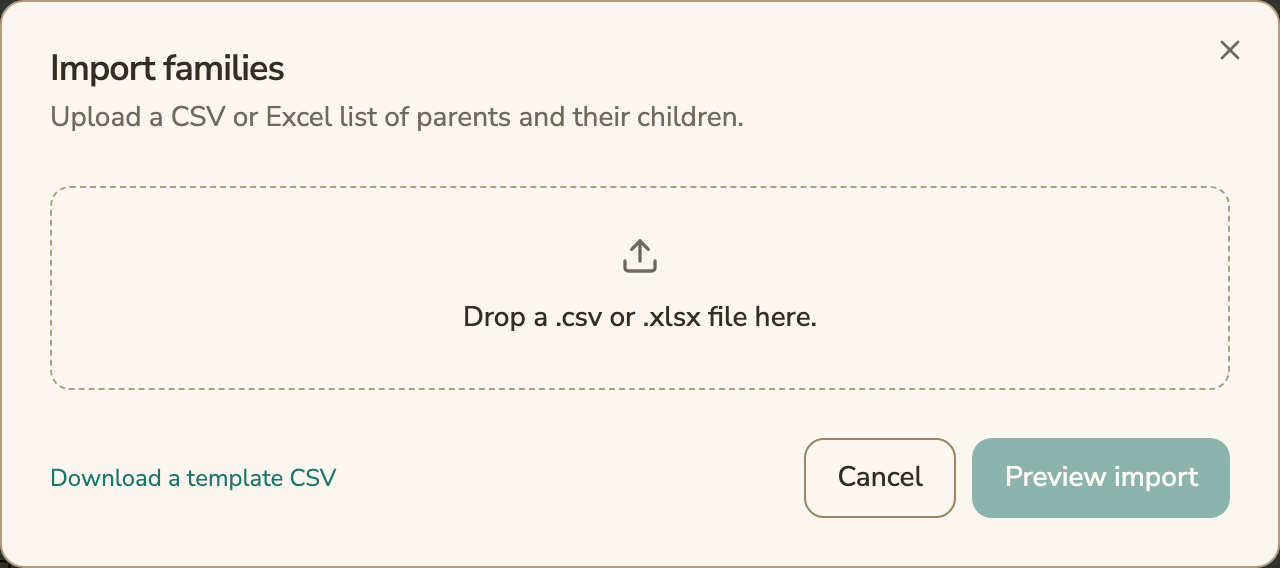
- Open Settings, then Import Families. Download the template CSV, fill it from your export, and drop in the .csv or .xlsx file.
- Choose Preview import, fix any rows it flags, then import. Assign each child to a classroom.
- Invite parents from the Family Roster.
The family import brings in parents and children. Keep your exported lesson records, reports and photos as files. See switching from another system.
Questions and answers
Transparent Classroom vs FutureNerds: which costs less?
FutureNerds costs less at every size we checked. At 40 children, FutureNerds is $15 a month and Transparent Classroom is $100 a month, based on its published $2.50 per child per month.
Does FutureNerds have AMI and AMS lessons like Transparent Classroom?
Yes. A FutureNerds school picks AMS, AMI or a custom curriculum, and lessons are tracked as not yet presented, presented, practicing or mastered.
Can FutureNerds bill tuition without a second product?
Yes. FutureNerds has built-in invoicing and online card payments through Stripe. Transparent Classroom offers tuition billing through its Onespot partnership.
Can I bring my Transparent Classroom data into FutureNerds?
You can import parents and children from a CSV or Excel file. Export your lesson records, reports and photos from Transparent Classroom before you cancel, and keep them as files.
Is there a free version of FutureNerds?
Yes. FutureNerds is free for your first 10 students. After that it is $0.50 per child per month, with no setup fee.
Sources
All checked October 14, 2026.
- Transparent Classroom home page: https://www.transparentclassroom.com/
- Transparent Classroom about page: https://www.transparentclassroom.com/about_us
- Transparent Classroom pricing: https://www.transparentclassroom.com/pricing
- Masterable and ongoing lessons: https://transparent-classroom.helpscoutdocs.com/article/66-masterable-verses-ongoing-lessons
- Applications overview: https://transparent-classroom.helpscoutdocs.com/article/52-applications-overview
- Onespot partnership: https://transparent-classroom.helpscoutdocs.com/article/452-onespot-transparent-classroom-partnership
- Parent mobile app: https://transparent-classroom.helpscoutdocs.com/article/40-share-with-parents-using-our-mobile-app
- Help center: https://transparent-classroom.helpscoutdocs.com/
- Cancelling an account: https://transparent-classroom.helpscoutdocs.com/article/287-how-do-i-cancel-my-account
- Downloading photos: https://transparent-classroom.helpscoutdocs.com/article/268-downloading-photos
- Onespot, exporting from Transparent Classroom: https://help.onespot.fyi/article/62-export-your-parents-staff-from-transparent-classroom
- Gitnux, best Montessori record keeping software: https://gitnux.org/best/montessori-record-keeping-software/
Less paperwork. More presence.
Free for your first 10 students. No credit card required.