FutureNerds vs Procare: Montessori software compared
FutureNerds vs Procare: pick Procare if you run a childcare center that wants Tuition Express payments, QuickBooks Online sync and state standards. Pick FutureNerds for Montessori records, billing and admissions, free for your first 10 students, then $0.50 per child per month.
How we checked Procare
Procare's own website could not be opened when we checked on October 14, 2026, so every Procare fact on this page comes from its help center at procaresupport.com. The help center lists three products: Procare Desktop, Procare Online and Procare SchoolCare Works. The table below describes Procare Online unless it says otherwise.
Feature table
| FutureNerds | Procare Online | |
|---|---|---|
| Montessori curriculum | Yes (AMS, AMI or custom) | Yes (Montessori learning milestones) |
| Observations and progress | Yes | Yes (milestone tracking) |
| Lesson planning | Yes | Yes |
| Attendance | Yes | Yes (sign-in and sign-out reports) |
| Parent app | Yes (iPhone, iPad, Android, Apple Watch) | Yes (iOS and Android) |
| Messaging | Yes (push, email and in-app) | Not in the help pages we checked |
| Billing | Yes (built in, with Stripe) | Yes (Tuition Express) |
| Admissions | Yes (form, waitlist, visit booking) | Waitlist and leads |
| QuickBooks | QuickBooks-format CSV export | QuickBooks Online sync |
| Languages | 14 interface languages | English and Spanish (AI Translate, off by default) |
| API or AI agents | Yes (MCP server and CLI, off by default) | AI agent in RoomRunner |
| Price | Free for 10 children, then $0.50 per child per month | Procare does not show a price we could check |
What each costs
Prices below were checked October 14, 2026. Procare does not show a price we could check.
FutureNerds costs (children minus 10) x $0.50 a month:
| Children | FutureNerds |
|---|---|
| 25 | (25 - 10) x $0.50 = $7.50 a month |
| 40 | (40 - 10) x $0.50 = $15 a month |
| 80 | (80 - 10) x $0.50 = $35 a month |
FutureNerds has no setup fee. If your school collects payments from families through FutureNerds, standard Stripe fees plus 1% apply. Payment processing fees are separate for every product. See pricing.
Where Procare is stronger
- Payments. Tuition Express takes credit, debit and ACH, with autopay and a Parent Wallet that saves up to six payment methods. FutureNerds takes cards through Stripe and records offline payments. Apple Pay and Google Pay are not available in FutureNerds yet.
- QuickBooks Online. Procare syncs invoices and payments in real time, with families mapped to QuickBooks customers. FutureNerds has no direct QuickBooks sync. It exports invoices and payments as a QuickBooks-format CSV.
- Standards. Milestones come with preloaded state standards for all 50 states as well as Montessori learning.
- Center reports. Procare reports include staff clock-in, emergency cards and historic FTE. FutureNerds has no payroll, staff scheduling, CACFP or subsidy tools.
- Planning room moves. RoomRunner forecasts and plans student moves.
- A desktop version. Procare Desktop is listed in the help center beside Procare Online.
Where FutureNerds is stronger
- Montessori progress levels. Every lesson is tracked as not yet presented, presented, practicing or mastered on an AMS, AMI or custom curriculum, and a progress grid shows a whole classroom at once.
- Work cycle planning. Guides plan a morning or afternoon work period from the Montessori lesson library and assign children to each lesson.
- Narrative report cards. Assessments have per-area narratives and no letter grades. A draft can be filled from your observations, and published reports are locked.
- Languages. FutureNerds runs in 14 languages, including Spanish, French, German, Chinese, Japanese and Korean. Procare's AI Translate covers English and Spanish.
- A published price. You can work out your bill before you talk to anyone.
- Admissions with visits. Families apply online, and the school can ask them to book a visit through Cal.com.
Who should pick which
Pick Procare if you run a childcare center that needs state standards, staff clock-in reports and a live QuickBooks Online sync.
Pick FutureNerds if you run a Montessori school and want records that follow presented, practicing and mastered, with billing and admissions in the same account. A 40-child school pays $15 a month on FutureNerds.
How to move from Procare to FutureNerds
- In Procare Desktop, open Family Data & Accounting, then Reports, then Data Viewer, then Child Relationships, and export to CSV, as Playground's migration guide describes. Procare's own help center gives the general path: Data Viewer, then Export, then CSV.
- In Procare Connect, open Reports, then Management, then Students & Family, per the same Playground guide.
- Export any attendance history you want to keep as a custom report in CSV. Keep it as a file.
- Create your FutureNerds school and pick AMS, AMI or a custom curriculum.
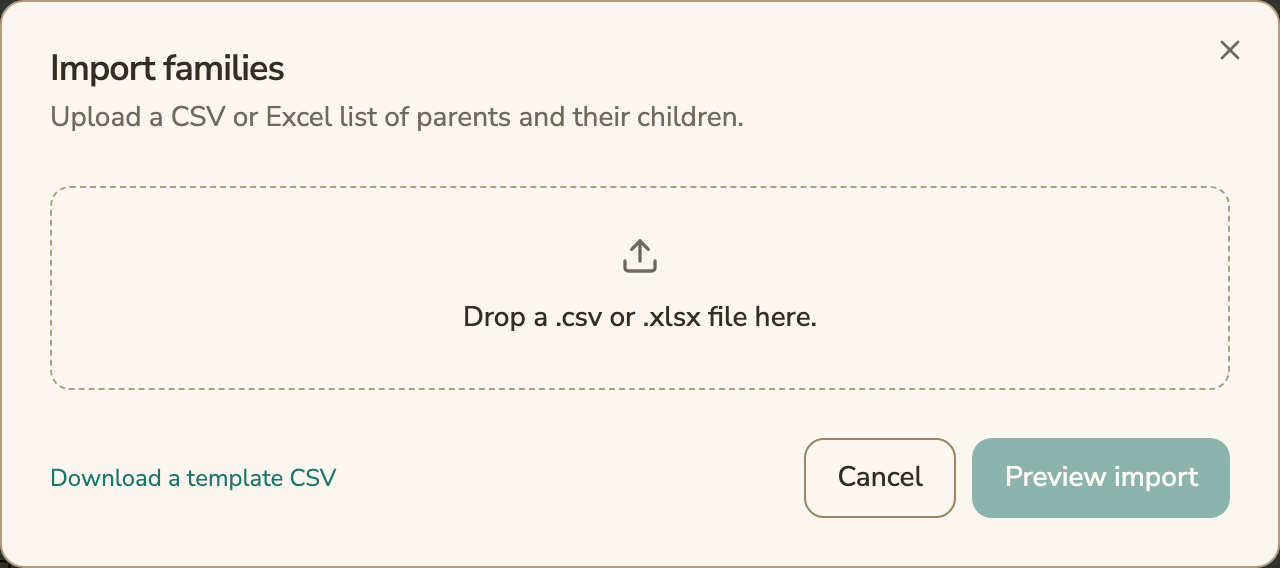
- Open Settings, then Import Families. Download the template CSV, fill it from your export, and drop in the .csv or .xlsx file.
- Choose Preview import, fix any rows it flags, then import. Assign each child to a classroom.
- Set up your price list and connect Stripe if you will take card payments.
- Invite parents from the Family Roster.
Questions and answers
How much does Procare cost compared with FutureNerds?
Procare does not show a price we could check. FutureNerds is free for your first 10 students, then $0.50 per child per month, with no setup fee.
Does FutureNerds sync with QuickBooks like Procare?
FutureNerds exports invoices and payments as a QuickBooks-format CSV that you import. Procare Online syncs with QuickBooks Online directly.
Does Procare support Montessori?
Procare's help center says its milestones include Montessori learning alongside state standards for all 50 states. FutureNerds is built around Montessori lessons tracked from not yet presented to mastered.
Can I move my Procare roster to FutureNerds?
Yes. Export your families and children to CSV from Procare, then use Import Families in FutureNerds, which accepts CSV and Excel files.
Does FutureNerds have staff time clocks or payroll?
No. FutureNerds has no payroll, staff scheduling or staff clock-in. Procare lists staff clock-in reports in its help center.
Sources
All checked October 14, 2026.
- Procare help center: https://www.procaresupport.com/
- Lesson planning and milestone tracking: https://www.procaresupport.com/procare-online/docs/lesson-planning-milestone-tracking.md
- Tuition Express: https://www.procaresupport.com/procare-online/docs/tuition-express.md
- QuickBooks Online: https://www.procaresupport.com/procare-online/docs/integrating-with-quickbooks-online.md
- AI Translate: https://www.procaresupport.com/procare-online/docs/ai-translate.md
- Mobile release notes: https://www.procaresupport.com/procare-online/docs/august-mobile-product-release.md
- RoomRunner: https://www.procaresupport.com/procare-online/docs/roomrunner.md
- Reports: https://www.procaresupport.com/procare-online/docs/reports
- Custom reports: https://www.procaresupport.com/procare-online/docs/custom-reports.md
- Bulk upload of student data: https://www.procaresupport.com/procare-online/docs/bulk-upload-of-student-data-xls-or-csv
- Procare Desktop report export: https://www.procaresupport.com/procare-desktop/docs/how-do-i-export-a-report
- Playground, roster exports from other systems: http://help.tryplayground.com/en/articles/5952521-migrate-data-roster-exports-from-other-systems
Less paperwork. More presence.
Free for your first 10 students. No credit card required.