After-school club management software for small schools
FutureNerds is after-school club management software for small schools. You set up each club with days, times, capacity and a fee, parents sign their children up in the app, and the first charge can be prorated when a child joins partway through a billing period.
What you set for each club
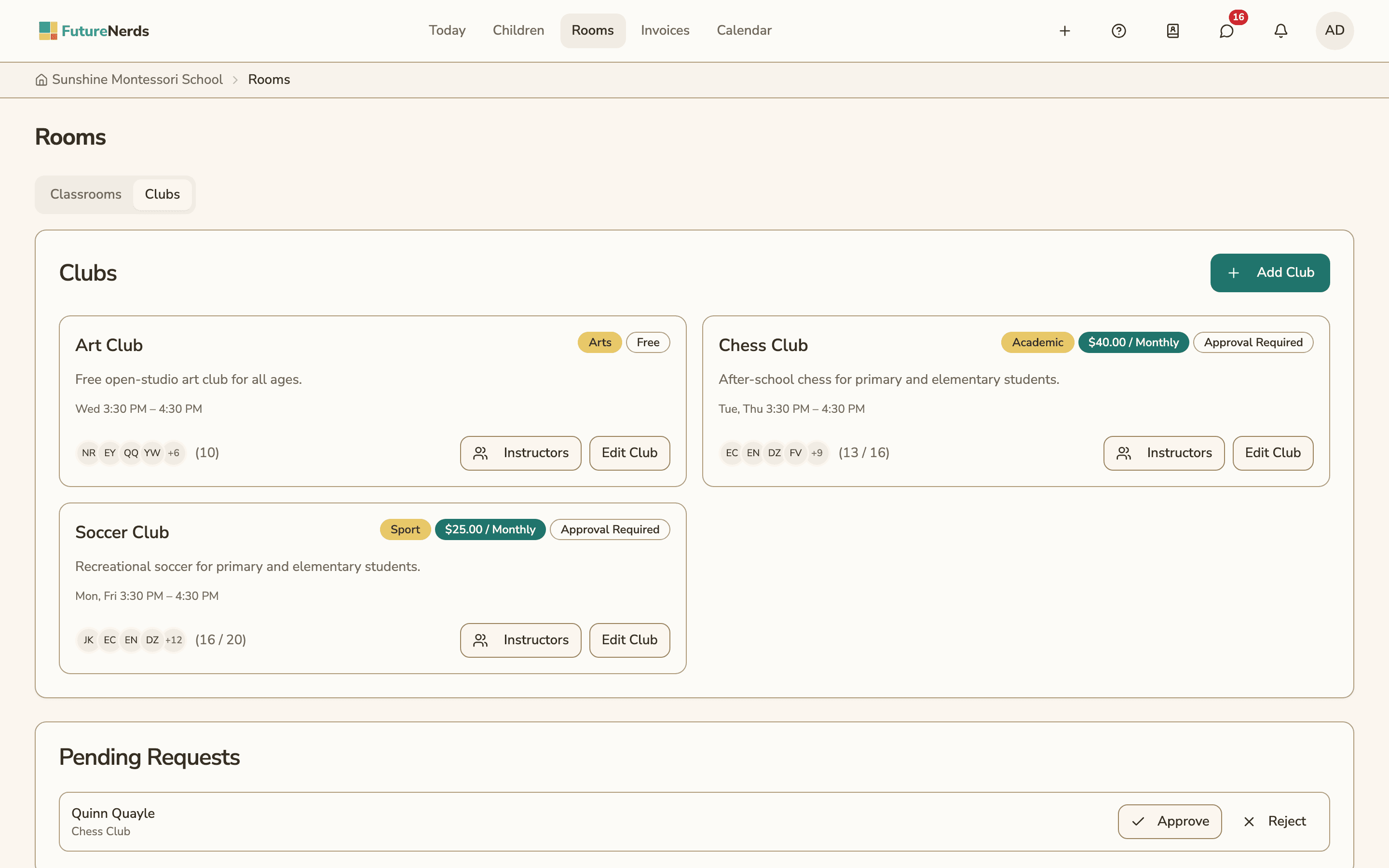
An administrator creates a club from Rooms, on the Clubs tab. Each club has these settings:
| Setting | What it does |
|---|---|
| Name and description | What families see on the club card |
| Category | Sport, Arts, Academic or Other |
| Capacity | The most children who can join. Leave it empty for no limit |
| Meeting days and times | The weekdays the club meets, with a start and end time |
| Season Start and Season End | Optional dates for a club that runs part of the year |
| Fee and Fee Frequency | The amount families are charged. Enter 0 for a free club |
| Prorate First Charge | Charge a partial fee for the rest of the current billing period when a child joins |
| Requires Approval | Staff approve each request before the child joins. On by default |
| Eligibility | The classrooms whose children can join. Leave it empty to open the club to all enrolled children |
| Message channel | A Messages channel for the club's families and instructors. On by default |
Club cards show the category, the fee and frequency, an Approval Required badge, the meeting times and how many places are filled, such as 16 / 20.
Instructors and meetings
You assign staff to lead each club under Instructors. A club can have more than one instructor.
Single meetings can change without touching the rest of the season. You can cancel one meeting or move it to another day or time. Club meetings show on the school calendar.
Administrators take club attendance, separately from classroom attendance. When a parent reports an absence for a day the club meets, they can tell the club as well.
How parents join
A parent opens Clubs in the app or on the web and picks a club their child is eligible for. Before they sign up, they see the Fee and the First Charge. If the child joins partway through a billing period and proration is on, the First Charge is the prorated amount for the rest of that period.
The parent ticks "I agree to be invoiced for this club fee" and sends the request. If the club needs approval, the request waits in Pending Requests until staff approve or reject it.
Each membership has one of four statuses:
| Status | Meaning |
|---|---|
| Requested | The parent asked and staff have not decided yet |
| Active | The child is in the club |
| Rejected | Staff turned the request down |
| Inactive | The child left the club or was withdrawn |
A parent can withdraw their child from a club. Club fees go on the family's invoices with the rest of their school charges.
Hiding a club
Hide Club takes a club out of use. Families can no longer sign up, billing for the club stops, and the club leaves the calendars.
Clubs work on the web, iPhone, iPad and Android.
How to set up an after-school club
- Open Rooms and choose the Clubs tab.
- Select Add Club.
- Enter the name, description and category.
- Choose the meeting days, the start and end time, and Season Start and Season End if the club runs part of the year.
- Enter the capacity, or leave it empty for no limit.
- Enter the fee and Fee Frequency, or 0 for a free club, and turn on Prorate First Charge if you want it.
- Leave Requires Approval on if staff should approve each child, and pick the eligible classrooms.
- Save, then select Instructors on the club card to assign staff.
What it costs
FutureNerds is free for your first 10 students. After that it costs $0.50 per child per month, with no setup fee. If your school collects payments from families through FutureNerds, standard Stripe fees plus 1% apply. See pricing.
Questions and answers
Can parents sign up for after-school clubs in the app?
Yes. Parents sign up in the FutureNerds app on iPhone or Android, or on the web. They see the fee and the first charge, and agree to be invoiced before the request is sent.
Does FutureNerds charge a partial fee when a child joins a club late?
Yes, if you turn on Prorate First Charge. The first charge then covers only the rest of the current billing period.
Can I limit a club to certain classrooms?
Yes. Pick the eligible classrooms on the club. If you leave the list empty, every enrolled child can join.
Can I approve club sign-ups before a child joins?
Yes. Requires Approval is on by default, so each request waits in Pending Requests until staff approve or reject it.
Who can take club attendance in FutureNerds?
Administrators record club attendance. It is kept separately from the child's classroom attendance.
Can a club be free?
Yes. Enter a fee of 0 and families join without a charge.
Less paperwork. More presence.
Free for your first 10 students. No credit card required.