By eleven in the morning you've given six presentations, watched a child repeat the pink tower four times and stepped in to settle a dispute at the snack table. If none of it is written down by pickup, most of it is gone. This post shows how to keep a daily record of presentations and progress in FutureNerds without taking your eyes off the room, and how families see that record.
Keep two records
Montessori trainers have long told guides to keep two separate records. Molly O'Shaughnessy, writing in the NAMTA Journal, calls them a record of what you did and a record of what you observed. The first is the list of presentations you gave and the stage each child has reached. The second is what you saw: how long a child worked, how often they repeated the work and what got in their way.
FutureNerds keeps both. Each child has a stage for every lesson (Presented, Practicing or Mastered), and a list of written observations. Before the first week, agree with your assistant on what each stage means in your room, so a mark means the same thing whoever made it. Tracking progress from presented to mastered has definitions you can start from.
Your school administrator sets up the curriculum once in Settings, under Curriculum. They can load the AMI or AMS curriculum and then add or rename lessons to match your shelves. If your school uses other words for the stages, the administrator can change them under Mastery Levels.
Plan the morning in Plan Work Cycle
Open your classroom and choose Plan Work Cycle. Pick the date and the Morning Work Period, find a lesson in the Montessori Lesson Library, and add the children you intend to present it to. A small-group lesson goes to several children at once. Work that has no lesson in the library, such as a nature walk, goes in as a Custom Activity.
After you give the presentation, set each child's stage on the same screen. A child who saw the material and had a turn is Presented. You can set a different stage for each child in the group.
Carry a printed observation sheet
A sheet on a clipboard lets you record during the work cycle without a screen in your hands.
From your classroom, open Observation Sheets and choose Generate Sheet. Pick one child or All Children, and a Sheet Date. You can print ahead for the week. Under What to Print, choose Pre-filled.
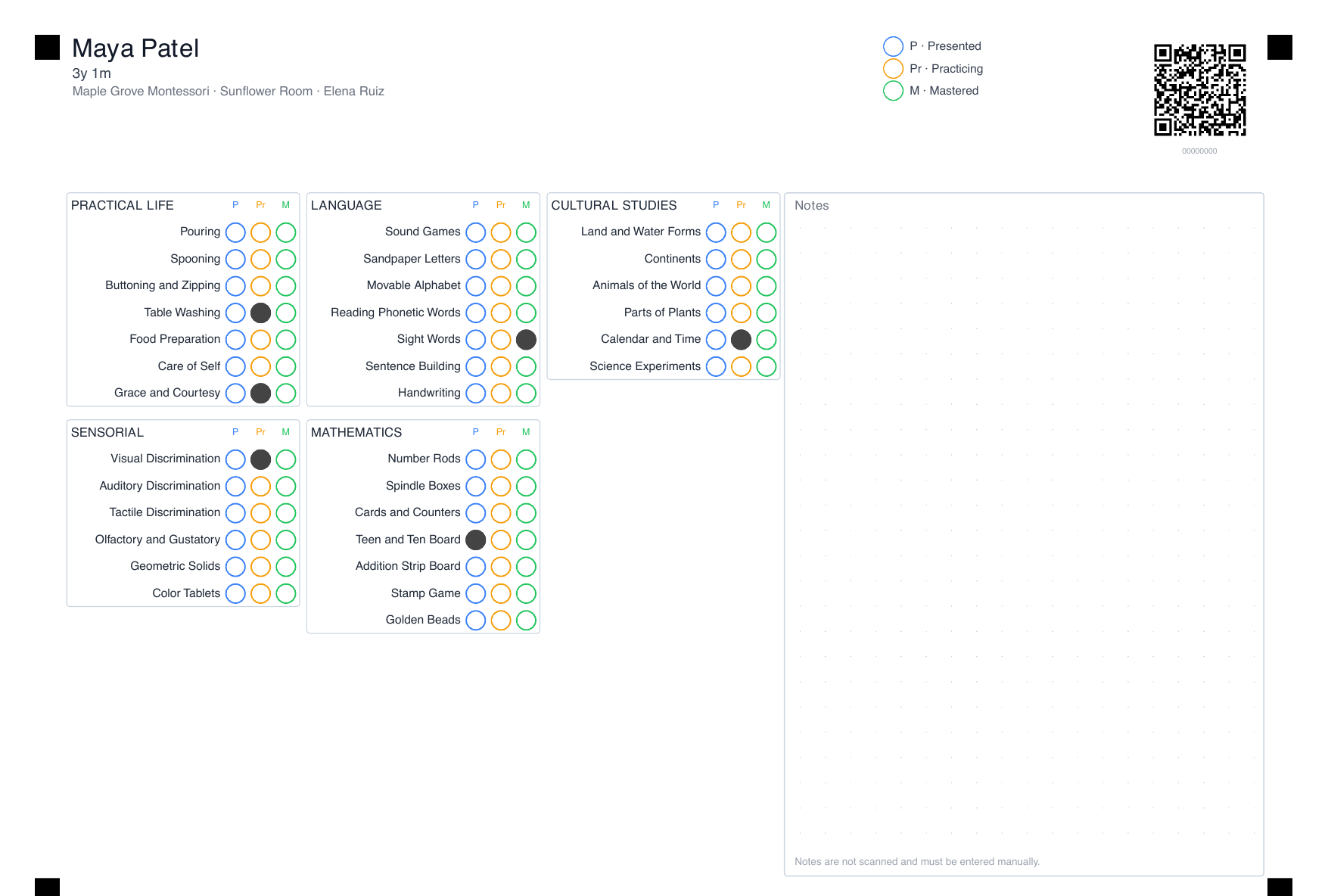
Each child gets one page. The page lists every lesson in the curriculum for your classroom's age level, grouped by area, with three bubbles beside each one: P, Pr and M. On a pre-filled sheet, the bubble for the child's current stage is already filled in dark gray, so you can see at a glance that a child is already practicing the spindle box and doesn't need it presented again. A Notes box at the bottom gives you room for short observations.
During the morning, fill in a bubble when a child moves to a new stage. In the Notes box, write what you saw: "chose the spindle box on her own, worked 20 minutes, counted 0 to 9 twice."
Move the marks in before you leave
At the end of the day, or during nap or after dismissal, open the Progress Grid for your classroom. It shows every child against every lesson. Click a cell to move a child to the next stage. Use Filter by area to work through one area at a time, the same order as your sheets.
Then turn the notes into observations. On a child's page, choose Record Observation and pick Specific Lesson to attach the note to a lesson, or General Observation for anything else, such as how a child settled after drop-off. Observations stay with staff unless you tick Share with parents.
A few habits keep the record honest:
- Record Presented on the day you give the lesson.
- Record Mastered only after you've seen the child do the work well on more than one day.
- Never move a child back a stage to mark a hard day. Write an observation instead.
What families see
Families can see each child's stages as soon as you record them. There's no separate step to publish a stage, so the agreed definitions matter: a parent who sees Mastered will ask about it at pickup.
Observations reach families only when you share them. Share the ones a parent can act on or would want to hear about, and keep working notes, such as a concern you're still watching, with staff. When you're ready to talk about a concern, raise it in person first.
Report a little every week
Choose one afternoon a week, often Friday, and go through the Progress Grid one area at a time. Look for lessons presented but never practiced, work a child has practiced for weeks, and areas with no recent marks. Share one or two observations per child that week, and add next week's presentations to Plan Work Cycle.
The same records feed your progress reports at the end of the term, which is the subject of the next post in this series.